Tilda Templates for Startups: Free Picks, Plans and SEO
TL;DR
The best Tilda templates for a startup are the short landing pages in the Business tab (Company landing page, Landing page for a business), the Mobile App pages and the Event pages of the gallery at tilda.cc/tpls, which held 329 templates on 6 November 2026. Test on the Free plan, then pay for Personal ($10 a month billed annually as of November 2026) the day you need a signup form or your own domain; if you would rather own your hosting, compare online platforms for founders first.
 Mean CEO | Violetta Bonenkamp
25/07/2024 - 14 mins read
Join the F/MS Startup Game now
Access all AI tools, advanced features & more!

Harness our free AI tools for building your startup.

Get a customized live roadmap for your startup.

Join our Community and connect with entrepreneurs.
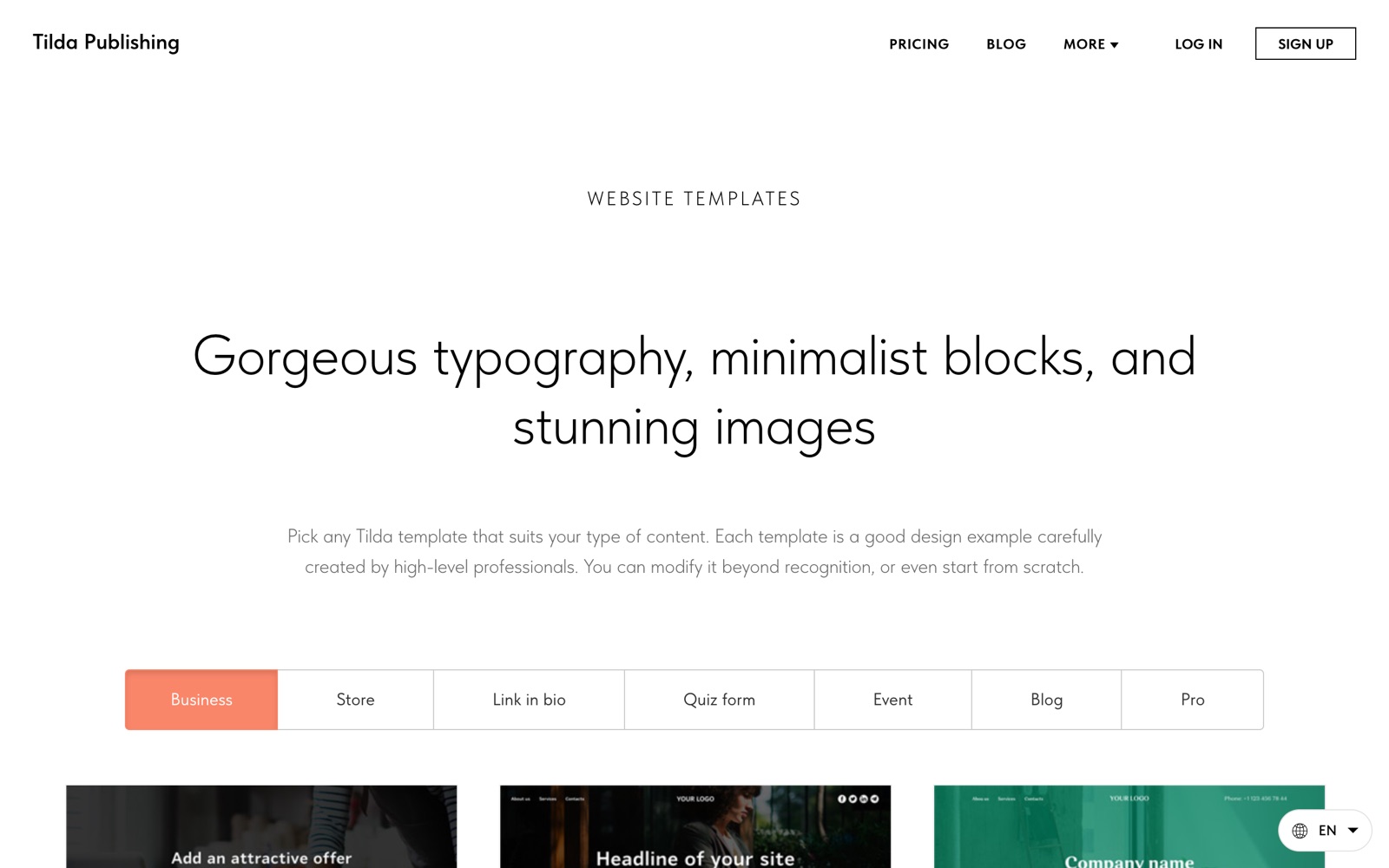
Tilda templates are ready-made website pages from Tilda’s own gallery, and on 6 November 2026 the Tilda template gallery held 329 of them in seven tabs, from business landing pages to event pages and Zero Block designs. For a startup the short version is this: start from a landing page, app or event template, swap blocks until the page tells your story, and move to a paid plan the day you need a signup form or your own domain.
I’m Violetta Bonenkamp, also known as Mean CEO, founder of Fe/male Switch. Our main site femaleswitch.com runs on Tilda, and so does our blog, the Fe/male Switch playbook. So I write this as a Tilda customer, and every plan detail, menu path and number below comes from Tilda’s own pages, checked in November 2026.
What are Tilda templates, and how do they differ from blocks?
A Tilda template is a complete page built from Tilda blocks: a cover, text sections, galleries, a form and a footer, already arranged and styled. A block is one horizontal section of a page, and the Tilda pricing page lists 600+ blocks on the paid plans and 100 blocks on the Free plan.
Tilda’s gallery says each template comes from professional designers and that you can change it beyond recognition or start from scratch. Most templates stack standard blocks, which you edit through content and settings panels. The Pro tab holds templates built in Zero Block, Tilda’s design editor, where you place every element by hand on a 12-column grid and set separate layouts for five screen widths, according to the Tilda Help Center.
Here is what the gallery held when I counted the tabs on 6 November 2026:
| Gallery tab | Templates | What’s inside | Startup use |
|---|---|---|---|
| Business | 118 | Company pages, service landing pages, mobile app pages, portfolios, schools | Your main startup site or a product landing page |
| Store | 27 | Online stores and single-product pages | Selling a physical product or a first batch |
| Link in bio | 56 | One-screen pages with buttons | The link in your Instagram or TikTok bio |
| Quiz form | 42 | Multi-step quizzes, surveys and application forms | Waitlists, customer surveys, lead questions |
| Event | 30 | Conferences, meetups, hackathons, webinars, courses | Demo days, workshops, online courses |
| Blog | 17 | Longreads, a corporate blog, a project presentation | Founder blog, launch story, investor update page |
| Pro | 39 | Zero Block designs with animation | A home page that looks custom-made |
Which Tilda website templates fit a startup?
The Tilda website templates that fit most startups are the plain landing pages in the Business tab, the Mobile App pages and the event pages, because they already hold an offer, features, reviews and a call to action in a sensible order. All the names below are the template names as Tilda’s gallery shows them.
| Startup page | Tilda templates to start from | Why it fits |
|---|---|---|
| Product or service landing page | Company landing page; Landing page for a business; Business page | Offer, company story, advantages, contacts and a call to action are already in place |
| Mobile app | Mobile App; Mobile App Extended; Mobile App Visual; Bright and flat app | Short app pages, a version with feature descriptions and a screenshot-based page with video |
| SaaS or B2B software | Dark-Corporate (Pro); Company page | No template carries a SaaS label; Tilda describes Dark-Corporate as a fit for a business home page or product presentation |
| Founder or freelancer portfolio | Designer portfolio; Web Designer Portfolio; Independent expert personal page; Frame (Pro) | One Web Designer Portfolio version already has case studies, pricing, FAQ and a project form |
| Online course or workshop | Study course; Webinar; Workshop; Social media marketing course | Course description, program, lecturer and a registration form |
| Event, demo day or hackathon | Business conference; Meetup; Hackathon | Speakers, schedule, sponsors, map and registration |
| Waitlist or customer survey | Quiz Form templates; Survey; Application Form | Multi-step questions that qualify a lead before you call them |
| Bio link for a tech company | Link in bio: Technology | Background image, logo and buttons with icons on one screen |
Tilda landing page templates
For a first product page I pick a template with the fewest blocks. Company landing page and Landing page for a business both follow the classic order of offer, proof and call to action, so you replace text and photos and you’re close to done. A long template looks impressive in the preview and then asks you to write copy for twelve sections you don’t need yet.
Tilda portfolio template
Founders who sell services, design, consulting or coaching do well with the portfolio and expert pages. Web Designer Portfolio publishes case studies through Tilda Feeds, so each new project becomes its own entry instead of another block on a growing page. If you are building a personal brand next to your startup, our guide to a founder website covers what to put on it.
Event and online course templates
The Event tab is the fastest way to get a registration page live for a meetup, a hackathon or a webinar. Pair it with our notes on running startup events and you have both the page and the plan for the day. Course templates work the same way for a pilot cohort, and Tilda’s own course tools (content editor, access management, homework review) sit on the paid plans.
Are Tilda templates free?
Browsing Tilda templates is free, and the Free plan lets you build and publish one website inside its limits. Tilda’s FAQ calls the free account lifetime, with a selection of blocks and a limited set of features, and offers a two-week trial with no credit card that opens all features and templates.
So use the trial to build the page you want, then check which parts survive on Free. These are the gaps the pricing table shows for the Free plan as of November 2026:
- Forms are off. Data collection forms and quiz forms need a paid plan, so a waitlist or contact form is the gap founders hit first.
- Your address stays on tilda.ws. Free has no custom domain, and you set the free subdomain in Site Settings, per the Help Center.
- Custom fonts, HTML code and a Google Analytics connection are locked. Tilda’s own website analytics stays on.
- SEO extras wait for an upgrade: the SEO Assistant, 301 redirects and a custom 404 page. Meta tags, H1 to H6 tags and image alt text do work on Free.
- Teamwork is missing, so a co-founder or freelancer who edits the site means Personal or Business.
- The “Made on Tilda” label stays. Removing it is an option on an annual Personal or Business subscription.
What the Free plan does include is generous for a test: 50 pages, Zero Block, animation, the vector editor, the built-in icon and image libraries, and Tilda’s AI page and text generation.
What do Tilda’s Free, Personal and Business plans include?
As of November 2026, Tilda costs $0 on Free, $10 a month on Personal and $20 a month on Business when you pay annually, or $15 and $25 a month when you pay month to month. Here are the differences that matter for a template site, taken from the comparison table on the pricing page.
| Feature | Free | Personal | Business |
|---|---|---|---|
| Price per month (annual / monthly billing) | $0 | $10 / $15 | $20 / $25 |
| Websites | 1 | 1 | 5 |
| Pages per website | 50 | 1,000 | 1,000 |
| Block library | 100 blocks | 600+ blocks | 600+ blocks |
| Zero Block | Yes | Yes | Yes |
| Custom domain and SSL certificate | No | Yes | Yes |
| Forms and quiz forms | No | Yes | Yes |
| Online store | No | Up to 5,000 products | Up to 50,000 products |
| SEO Assistant and 301 redirects | No | Yes | Yes |
| Teamwork | No | Yes | Yes |
| Remove the platform label | No | Yes, on annual billing | Yes, on annual billing |
| Source code export | No | No | Yes |
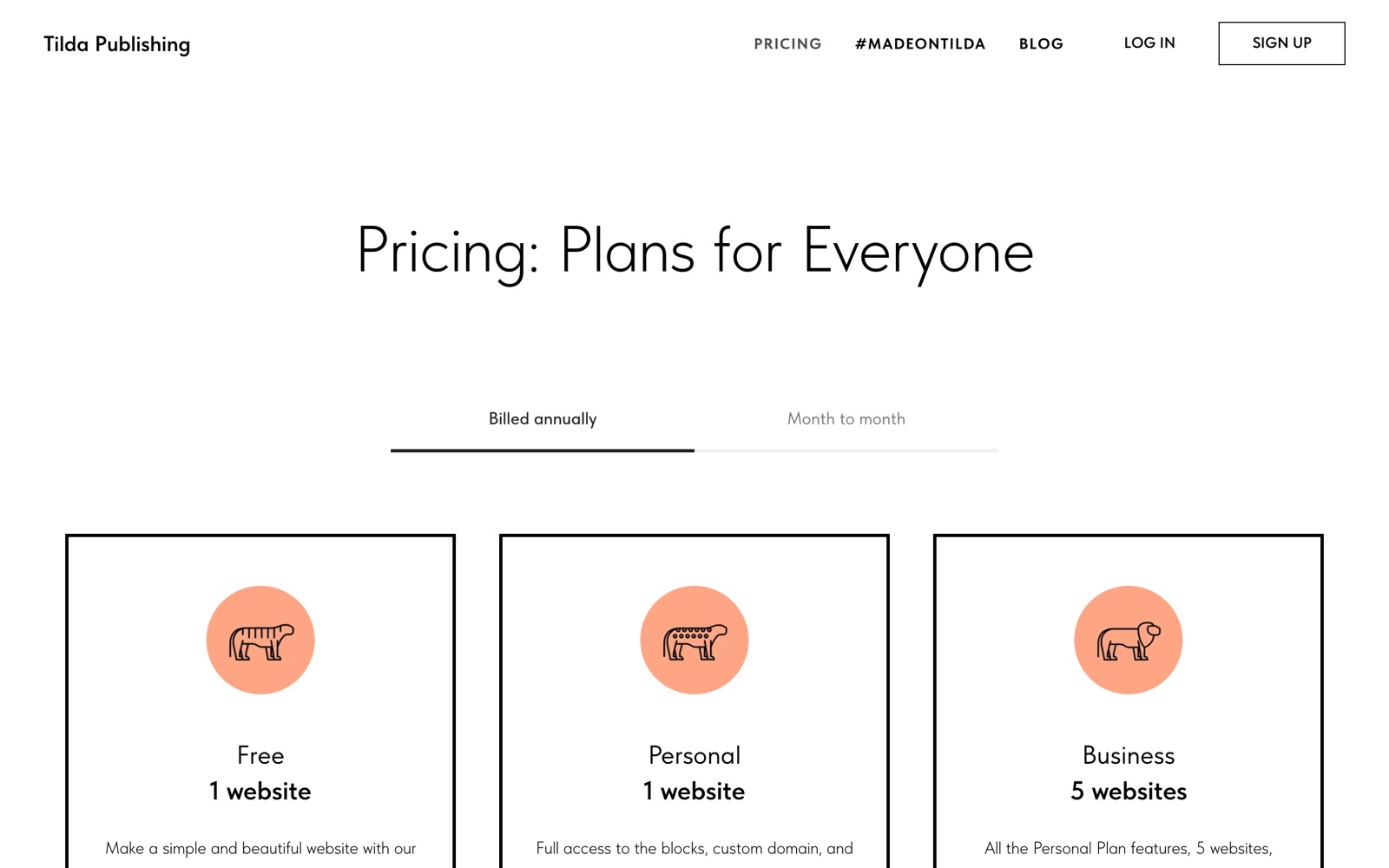
Two details from the pricing FAQ belong in your budget. A website on Tilda gets unpublished when you stop paying, and Tilda keeps your data for six months before it deletes it for good. Fonts and colors are set per website, so separate landing pages with different styles and domains count as separate websites, which is the moment the Business plan pays off.
My rule for founders: test on Free, pay for Personal the week you collect your first email address, and move to Business only when you run a second brand or need the code export.
How do I pick and customize a Tilda template?
Pick a Tilda template by its block order, then replace everything inside it. The order of sections decides how fast a visitor gets your offer. Let’s break it down.
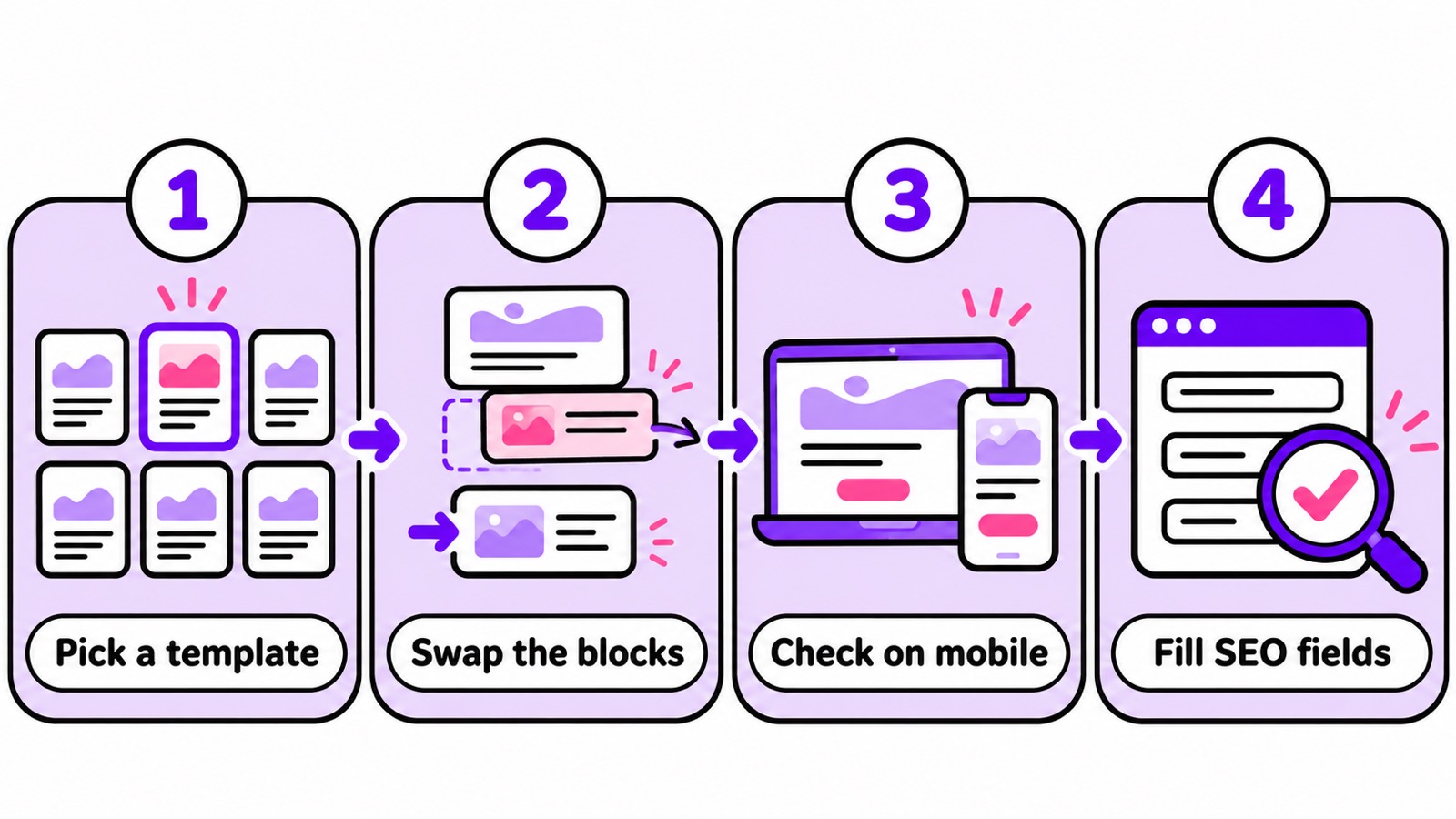
1. Write the page outline before you open the gallery
List the sections your visitor needs: the problem, your offer, proof, price and the signup. Then open the gallery previews and choose the template whose sections come closest to that list.
2. Set your style once for the whole website
Fonts and colors are website settings on Tilda, so set them before you touch single blocks and every page follows. Prepare your cover images and icons in advance; our guide to Canva for startups shows how we make those visuals quickly.
3. Swap, delete and add blocks
Delete every block you can’t fill with real content today. For a hero section that looks unlike any template, add a Zero Block: click Zero at the bottom of the page editor, then the Block Editor button, then the plus button to add text, images, shapes, buttons or forms, as the Help Center describes.
4. Check every screen size
Standard blocks adapt by themselves. Zero Block layouts need a manual check, because the editor has five breakpoints, from desktop at 1200px and wider down to a vertical smartphone at 360 to 480px.
5. Save your version as your own template
Once a page works, go to Page Settings, then Additional, and tick “Save page as a template”. It shows up in the My Templates tab next time you create a page, per the Help Center guide on page templates, which saves hours on your second and third landing page.
6. Fill the SEO fields and test the page
Follow the SEO checklist further down, then put the page through a landing page analyzer before you send traffic to it.
Is there a Tilda templates marketplace?
I found no official Tilda marketplace for third-party templates on tilda.cc in November 2026; Tilda’s own gallery is the free catalog inside the editor. Independent designers do sell Tilda templates, and Tilda’s system delivers them as a Template ID.
The Tilda Help Center sets clear rules for that:
- The seller needs an active annual Business plan to share a template by its number.
- The buyer needs a paid Personal or Business plan to create a page from a shared template. A trial or a promo code doesn’t count.
- You install it from the dashboard: Create new page, scroll to the end, click Enter Template ID and paste the number.
Before you pay a template seller, ask for a live preview link, confirm the template comes as a Template ID, and ask whether it is built in Zero Block. Zero Block templates mean extra work on five screen sizes.
How do I hire a Tilda expert or freelancer?
Tilda runs its own directory of Tilda experts and freelance designers at Tilda Experts, with 1000+ designers who build websites on Tilda for clients. You fill out a brief, the system sends it to designers who match your task, price and requirements, and interested designers send you their portfolio and contact details.
Tilda takes no commission and does not act as an intermediary, and it says plainly that it cannot guarantee the quality of a designer’s work. So check portfolios on live sites, agree the scope in writing and keep the Tilda account in your own name.
When a Tilda expert is worth the money
- A custom Zero Block design with animation that has to look right on all five breakpoints.
- An online store with a product catalog, payments and promo codes.
- A move from another builder that needs 301 redirects for every old URL.
- Your launch date is fixed and you have no time to learn the editor.
For a single landing page from a template, do it yourself; the template already did most of the design work. Put the gallery name of the template you like, your plan, your page list and your deadline in the brief, and you’ll get better offers.
Tilda freelance work for designers
If you are on the other side and want Tilda freelance clients, Tilda says a portfolio on Tilda Experts takes about 10 minutes: create a profile, describe your skills, set your rates and link client projects with your Website Designer ID from their Site Settings.
Where can I see Tilda customer stories and site examples?
Tilda publishes customer stories on Tilda Education and real site examples in its #madeontilda gallery, where Tilda’s designers regularly select outstanding projects from submissions. The submission form asks for a complete, mobile-friendly site with working links and buttons, which doubles as a decent launch checklist.
One of the Tilda customer stories is ours. In Tilda’s success story about Fe/male Switch, our partnerships team explains that building the landing page on Tilda saved us money because we didn’t hire an outside designer. She also names what mattered most to us: connecting external services and payment systems, and a site that is easy to set up for search engines. Tilda’s pricing page still carries my own testimonial as co-founder and CEO of CADChain and Fe/male Switch.
Study Tilda examples in your niche for the order of sections, then write your own words.
What should a Tilda SEO checklist for a template site include?
Start by replacing every default title, heading and paragraph of the template with your own. Then work through this Tilda SEO checklist, with the menu paths from Tilda’s Guide to SEO:
- Title and description per page: Page Settings, then SEO, then “Customize search results preview”. Tilda asks for a unique title on every page.
- Readable page URL: Page Settings, then General, then Page URL, with words like /pricing instead of a system address.
- One H1 per page: in each block’s settings, pick the heading level in the “SEO: Title tag” dropdown. Templates come with their own heading levels, so check them.
- Alt text for images: in the block’s Content panel, next to each image. Background images don’t need it.
- Social media preview: Page Settings, then Social Media, for the image, title and description people see when they share your link.
- Google Search Console: Site Settings, then SEO, then Google Search Console. Assign and publish your home page first.
- Sitemap and robots.txt: Tilda generates both automatically, and you can edit them under Site Settings, then SEO.
- Redirects and SEO Assistant: Site Settings, then SEO. Both sit on the paid plans.
- Canonical URL: set automatically once your custom domain is connected and all pages are published.
On the Free plan your site stays on a tilda.ws address without the SEO Assistant or 301 redirects, so treat Free as a test site. The day you want Google traffic, connect your domain on a paid plan.
When is Tilda the wrong choice for a startup?
Tilda is the wrong choice when you need to own your code and hosting, run a large content site with plugins, or build many differently styled sites on a tiny budget. These are the limits I’d weigh before committing:
- Your site depends on the subscription. Stop paying and the site gets unpublished; the data waits six months.
- Code export only comes with Business. On Free and Personal your site lives only on Tilda.
- Each differently styled site counts as a website. Personal allows one, Business allows five.
- Zero Block works on a fixed 1200px grid. Designers who want a different grid have to design around it.
If you need plugins, your own hosting or a content site with several authors, read our guide to WordPress for startups, which covers the real costs, setup and limits. Before you commit to either one, see how Wix, Squarespace and WordPress compare in our guide to online platforms every founder can use, and add the rest of your stack from our list of tools for entrepreneurs.
FAQ about Tilda templates
Are there free Tilda templates?
Yes. Browsing the gallery at tilda.cc/tpls costs nothing, the two-week trial opens every template, and you can publish one website on the Free plan. Forms, a custom domain and the full block library need a paid plan.
What is the best Tilda landing page template?
For a startup, Company landing page or Landing page for a business in the Business tab, because they follow the offer, proof and call to action order with few blocks. App founders start from the Mobile App templates.
Is there a Tilda portfolio template?
Yes, several: Designer portfolio, Web Designer Portfolio, Portfolio and Video Portfolio in the Business tab, plus Frame and Designer Portfolio in the Pro tab.
Can I buy Tilda templates?
Independent designers sell them and share them by Template ID. You need a paid Personal or Business plan to create a page from a shared template, and the seller needs an annual Business plan.
Does the Tilda free plan allow team collaboration?
No. Teamwork is listed for Personal and Business only, so a co-founder or freelancer editing the site means a paid plan.
Can I create a presentation with Tilda?
Yes. The Blog tab has a Project presentation template, and the Pro tab’s Dark-Corporate is described for product presentations.
Keep learning
Authors
Mean CEO | Violetta Bonenkamp AUTHOR
MeanCEO (aka Violetta Bonenkamp) is a serial startup founder who brings a decade of entrepreneurial experience to the table. Armed with five Higher Education degrees (including an MBA) and profound knowledge in sectors like blockchain, AI, zero code and education she is a maestro in turning ideas into validated businesses, building prototypes in a few hours and devising marketing strategies for tech startups that increase founder's chances of success. Recognized as one of the top 100 women in EU startups, her guidance is a treasure trove for upcoming and established entrepreneurs alike. Through her venture into entrepreneurship, she has created the "gamepreneurship" methodology, an innovative method for learning business through gameplay.
Elona Musk
Elona Musk stands as a mix of innovation and expertise in the realm of AI, serving as the Chief AI Officer at Fe/male Switch. As an embodiment of the startup game for women, Elona is the co-founder you dream of - knowledgeable, always active, capable of keeping trade secrets to herself and equity-free. With her hands-on approach in entrepreneurship simulation, she provides vital strategies and insights that are essential for navigating the complex startup journey and saves entrepreneurs hours of work by automating many tasks, starting from market research to managing social media to writing business plans. Whether it's a marketing strategy for tech startups that you need or a solid IP strategy, Elona's AI-driven insights help carve successful paths for entrepreneurs who don't have technical or startup skills.
Who we are
We are experienced and fun entrepreneurs and awesome AI PlayPals who love building a startup simulator for you to succeed in business
Violetta Bonenkamp
Business and AI expert

Dirk-Jan Bonenkamp
Legal, IP and finance expert
Elona Musk
The first AI entrepreneur
Petra Thiel
The first AI startup investor

Samantha Altman
The first AI startup mentor

Sia Quick
AI Market Research expert
Unleash your inner founder with AI Startup Tools!
Don't just dream it, build it with our range of AI startup tools. From brainstorming ideas to naming your product and crafting a unique logo, these AI tools are your secret weapon to conquer the startup world.
 Newest
Boost Your SEO Game
Generate a customized SEO strategy for your small business agency by answering a simple question. Our tool focuses on free and easy…
 27
19
5/5
Newest
Positioning Pro - Your Strategic Partner
Positioning Pro helps bootstrapped entrepreneurs discover effective segmentation and targeting strategies without spending money. Get tailored insights simply by answering one question.
13
6
5/5
Newest
Gated Content Strategy Tool
This tool provides actionable strategies for bootstrapped entrepreneurs, leveraging free and easy methods to kickstart your journey.
25
18
5/5
Recommended for you
Venmo Small Business Grant: Amounts, Rules and Next Round
Every Venmo Small Business Grant round checked against Venmo's and PayPal's own pages: amounts, winners, eligibility, judging, status and open alternatives.
Read more
Small Business Grants for Women in Texas: Amounts and Dates
Texas grants for women-owned businesses checked on official pages: TWU StartUP and Rural grants, Amber Grant, state and city programs, rules and deadlines.
Read more
Your First Cold Campaign: A Deliverability Guide for Founders
First cold email campaign? Set up a separate sending domain, SPF, DKIM and DMARC, warm up, clean your list and run this pre-send checklist before you hit send.
Read more